
A development note. This is a personal record of the work I’m doing on PandaForce. When I say develop, I mean the development branch in the GitHub repository, not a released version. There’s still plenty to build and polish, and these features are a good way from a final release.
Abstract
My first article about PandaForce was about using Codex without staying next to a computer. The develop branch has moved on since then. Project material, documents, knowledge search, reusable skills, and Bot tasks submitted from the outside now live in one workspace. A company can run it on its own infrastructure, keep the data in its own hands, and wire the AI into the applications it already uses.
What I actually care about is the work this saves once the pieces sit together: an experienced colleague explaining the same checks for the tenth time, a newcomer hunting for the right material again, an operator copying information between systems all day. Those are the reasons I keep working on this open-source project.
Part I · From one person's tool to a team's
01What’s taking shape on the develop branch
For one person, a decent model and a few good prompts go a long way. A company has more to sort out. The material is scattered across different people, a decision has to say what it rests on, the result has to be handed to someone else, and sooner or later it has to land back in a business system. A well-written AI response is usually just where the work begins.
This round of work on PandaForce is about everything that comes after that first step. Conversations and coding are untouched: administrators can still see what a tool ran, what a file changed, and still gate the approvals. What’s new is the workspace, and it pulls content and business tasks into the same place.
A project holds the working directories, documents, conversations and creative outputs together. A document can be edited, rolled back to an earlier version, and run through AI to proofread, rewrite or translate — the changes sit there until you’ve looked at them and decided to apply them. Personal work can start on its own and be dropped into a project when it’s ready to hand over. Come back a few days later and you still have something you can keep working with, not a conversation that scattered the moment it ended.
As the material piles up, you can search inside a project, pull in existing Markdown, Hexo and Docusaurus content, and pick a few of those sources to anchor a knowledge task. The “how” of the work goes into skills: drafting a requirement, reviewing a technical proposal, writing up meeting notes, each with a reasonably fixed set of steps. And the jobs that have to be kicked off by a business system get handed to a Bot.
All of this is on the public develop branch, and the repository carries a bilingual feature catalog. This article describes the source as of November 16, 2026 — an older Docker release doesn’t grow these features just because the develop branch has moved ahead.[1]
02Less to re-explain at every handoff
Take a product requirement. It might start as a few meeting notes, then collect interface constraints, screen descriptions, and the conclusions of several discussions. By the end, the product manager wants a draft worth reviewing, developers want to know which constraints are settled, and testers need to pull acceptance criteria out of it. One pile of material, three people wanting different things from it.
In PandaForce, that material can go into a single project. You pick the right sources and skills, draft something, and keep editing it in the document. You can read each AI change before deciding on it, and confirmed text has a save-and-recover path. The next person to pick it up has a real starting point, instead of reconstructing the background from someone’s chat history.
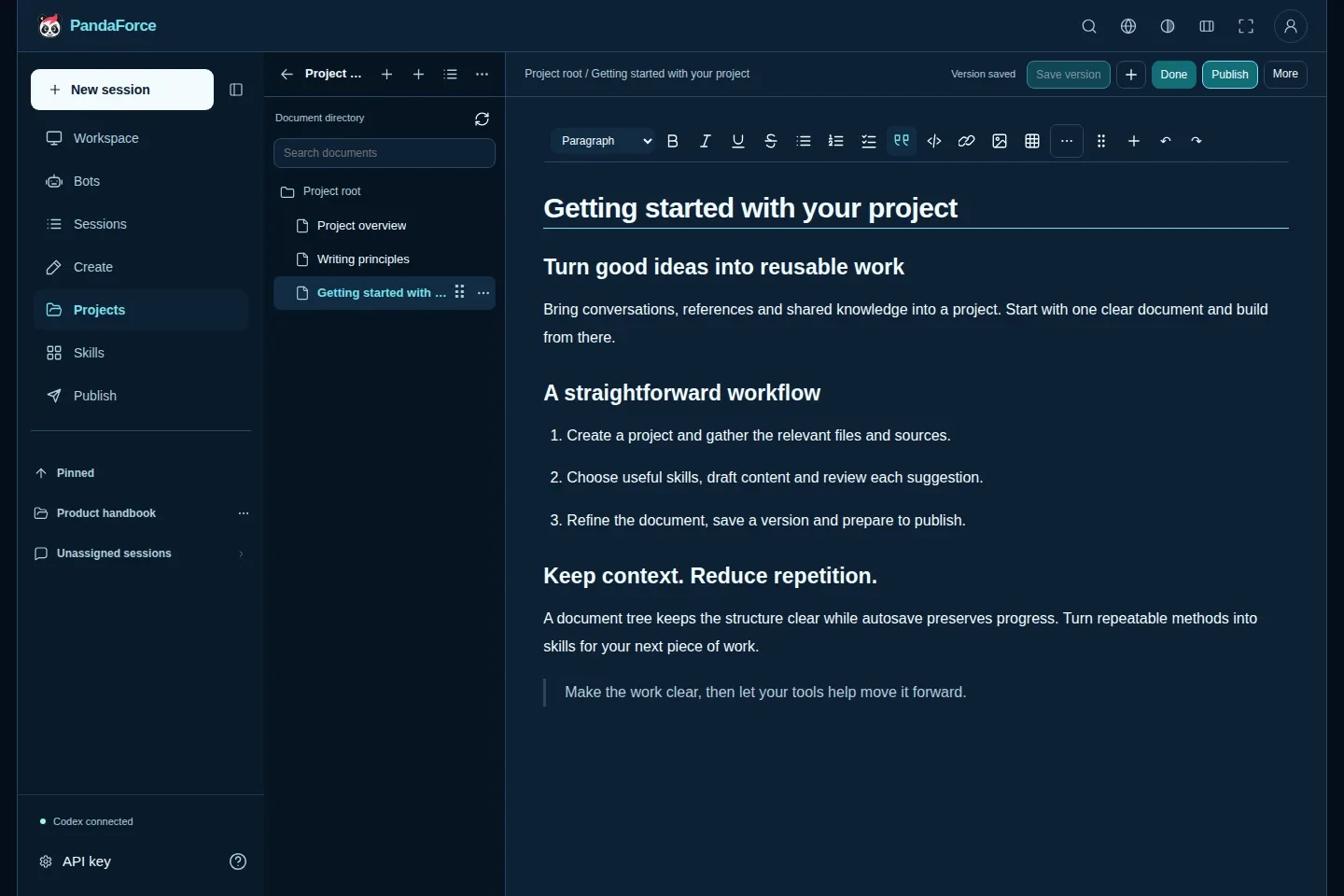
Figure 1 · Keep the material and the result with the project. This is the current document workspace, with fictional demonstration content. AI edits build on what’s already there rather than starting over.
For now, collaboration revolves around authorized business content: one person organizes the material, another drafts with AI, and someone with the judgment to decide reviews it and hands it off. Live multi-cursor editing and org-directory sync aren’t in this update.
Accounts can be managed locally. An administrator doesn’t need an email address to initialize things; configure SMTP when it’s time to bring people in, and they’ll set their own passwords from the invitation. Desktop and mobile are the same workspace, so you can check a task or answer a question without being at your desk. For whoever is on the hook, cutting out one “let me deal with it when I’m back at my laptop” already counts for something.
And the work has to go somewhere in the end. The exports, site builds and publishing flows turn a document into material people can read and use elsewhere. An existing knowledge site doesn’t have to be torn down, either: supported sources can be imported, the connected originals stay read-only during the import, and you publish on your own schedule afterward.
Part II · Keep the experienced person's method
03From a colleague’s judgment to a reusable skill
A company carries a lot of knowledge that reads as one line in a document and takes years of experience to apply well.
“Product benefits must be backed by evidence” is that kind of line. Someone who knows the work understands the rest: a material spec can back up a fabric description, the sample weight for one size tells you nothing about the others, and a coating you can see in a photo doesn’t mean the jacket passed a waterproof test. A newcomer who reads only that one line usually doesn’t know what to check, how to judge it, or what to do when a piece is missing.
Experience like that is a good fit for a skill. The work of writing one is really just writing down, step by step, the checks a competent person already runs in their head. For “extract the selling points,” a first version you can try out might say:
Start from the attributes, test information and usage limits provided here. Give a source for every candidate selling point; the ones without enough backing get listed separately as open questions. In the output, keep the applicable sizes and conditions, and don’t inflate performance you can’t prove. Last, check that the title, the selling points and the detail copy don’t contradict each other.
Here the knowledge material supplies the facts and the skill supplies the method, and both need someone to tend them. Handing AI an entire policy manual doesn’t spare you the job of making the unwritten judgment explicit.
In my earlier Lattice article I wrote about turning architectural experience into a Skill: check business identity, module ownership and dependency direction before you start coding. The skill management in PandaForce follows the same line of thinking. Product operations has its own judgment, a technical review has its own order of checks, and both deserve to be written down plainly rather than left in one person’s head.
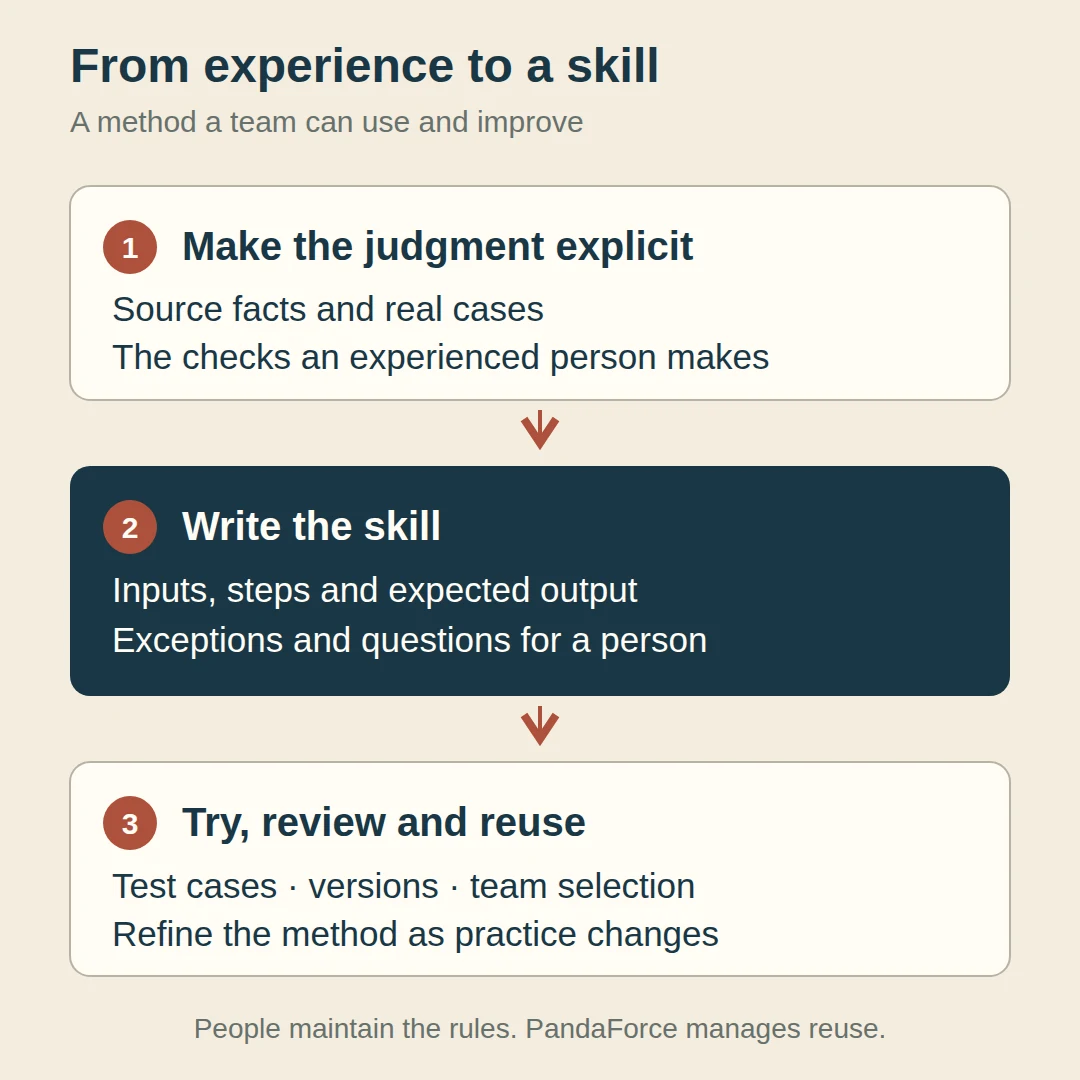
Figure 2 · Going from experience to a skill takes a real pass by a person. PandaForce handles installation, selection and version management; writing the rules, checking them against cases, and judging whether they hold up still belongs to people. It isn’t quietly training you a private model.
04Teach the same thing fewer times
On the develop branch you can browse skills by category and see the source, version, license and the permissions each one needs. You install from supported packages, combine them, give them parameters. Upgrades get a review first; versions switch along a supported path, and roll back. Skills that have been disabled, removed, or left without the authorization they need drop out of the pool of things you can actually run.
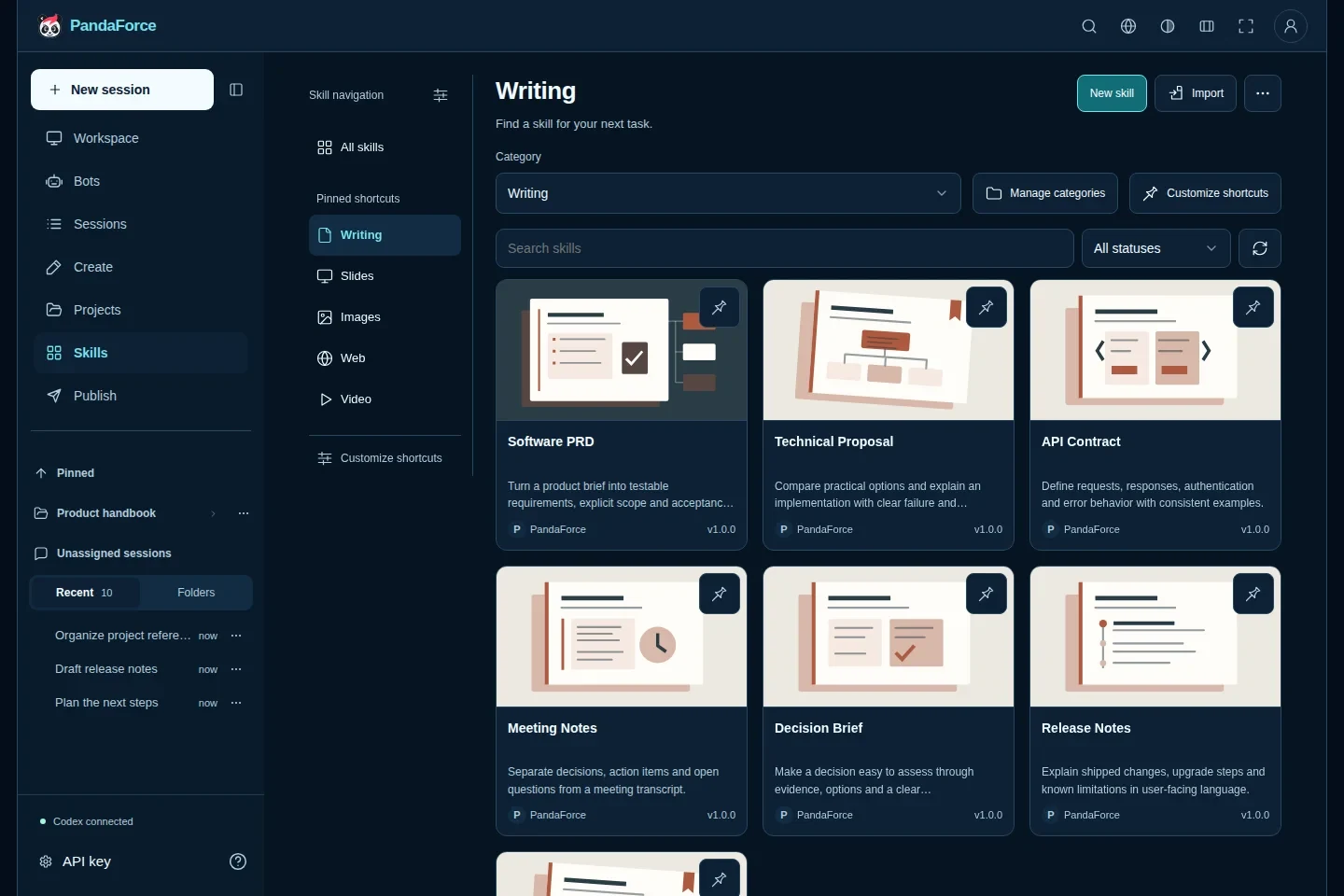
Figure 3 · What a team reuses is a method it can maintain. Each skill has a name, a purpose and a version; the people using it pick from them, and the people maintaining it have somewhere to update or retire it. The screenshot uses demonstration content.
Where the reuse pays off is easy to see in the actual work. A newcomer writing their first requirement doesn’t have to go find a senior colleague for a complete prompt. Nobody has to rebuild the section layout of the same report from scratch. When a checking rule changes, you maintain the one skill instead of chasing down everyone’s privately saved copy of the text.
A good skill also changes what the reviewer does. More of their attention goes to the things that take judgment — whether the facts are enough, whether an exception really holds — and less to adding the same missing sections or fixing the same awkward phrasing yet again. Whether a skill actually saves anything is something you can test on a handful of past tasks: which repeated questions went away, which habitual mistakes stopped showing up, and which risks still need a person watching them.
For a company there’s a longer-term payoff in that. When a task is done, the team walks away with more than the output — it walks away with a more mature way of doing the work. When someone leaves and the work changes hands, that experience can still be used, instead of disappearing along with one person’s private thread.
Part III · Let the business system start the work
05Bot: bringing AI into day-to-day operations
A lot of operational work is the same thing every day, in roughly the same steps: open a batch of material, read the text, look at the images, check the facts, then reshape it into some other format for the next person or the next system. New product listings, support tickets, content review — all of it runs this way. Any one item is easy; it’s the volume that eats the hours.
The jobs usually sit behind a business system already. The product system knows which batch of material just came in, the support system knows which tickets are still backed up, the requirements system knows which document just entered review. My idea is simple: wire a PandaForce Bot into those points, so a business event calls up the AI to do the work. People keep working in the system they already know, and a stretch of the workflow quietly runs itself in the background.
A multimodal model lets that stretch read the text and the images together. It can line up product photos, labels and written attributes, pull out the selling points that actually hold, and draft the product detail. It can read an error screenshot next to a user’s description, summarize the problem, and suggest a category. Work that used to mean opening, transcribing and rewriting each item one at a time becomes something you can run in a batch.
And what the Bot hands back isn’t a chat-style text answer — it’s something the next step can use directly. The facts it recognizes can become copy, a theme brief, illustrated instructions, or review notes that feed the next stage of the work. When you get to generating images, retouching, or final layout, you hand the tidied-up requirements to the design or rendering service the company already has. The Bot reads the text and images, makes the calls, and prepares the content; producing the actual artwork is left to the services you connect.
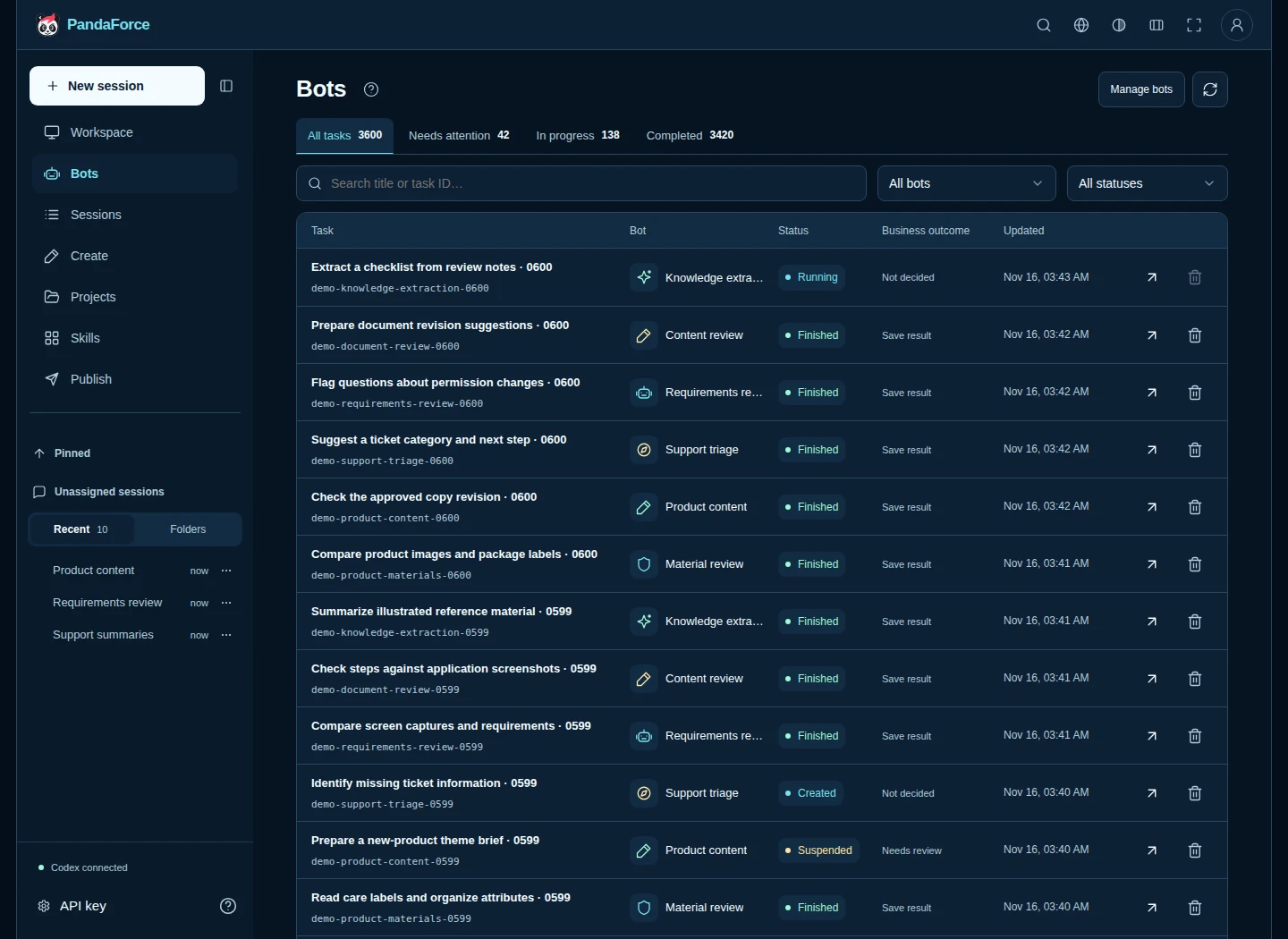
Figure 4 · Different kinds of work, managed in one list. To show the interface, I built 3,600 fictional tasks in an isolated environment across six Bots. The counts come from the demo database — they aren’t real workload, and they aren’t a concurrency benchmark. Open the full-size screenshot.
Once the queue gets long, operators need to tell what’s done, what’s still waiting, and what’s stuck on missing material or a call nobody’s made. The list filters by assistant, status or keyword, and each task opens to its processing record. When a Bot needs a review, it leaves the question on the task and picks up again once someone answers. People stay on the uncertain and the exceptional, instead of reading and drafting every single item from scratch.
Now for how a Bot actually gets set up. Connecting a kind of work comes down to configuring one Bot for it: write its instructions, pick its model, name the callback hosts it’s allowed to reach. One kind of work, one Bot, with its requirements kept in its own configuration — so when the rules change, you change them in that one place instead of touching every downstream system.
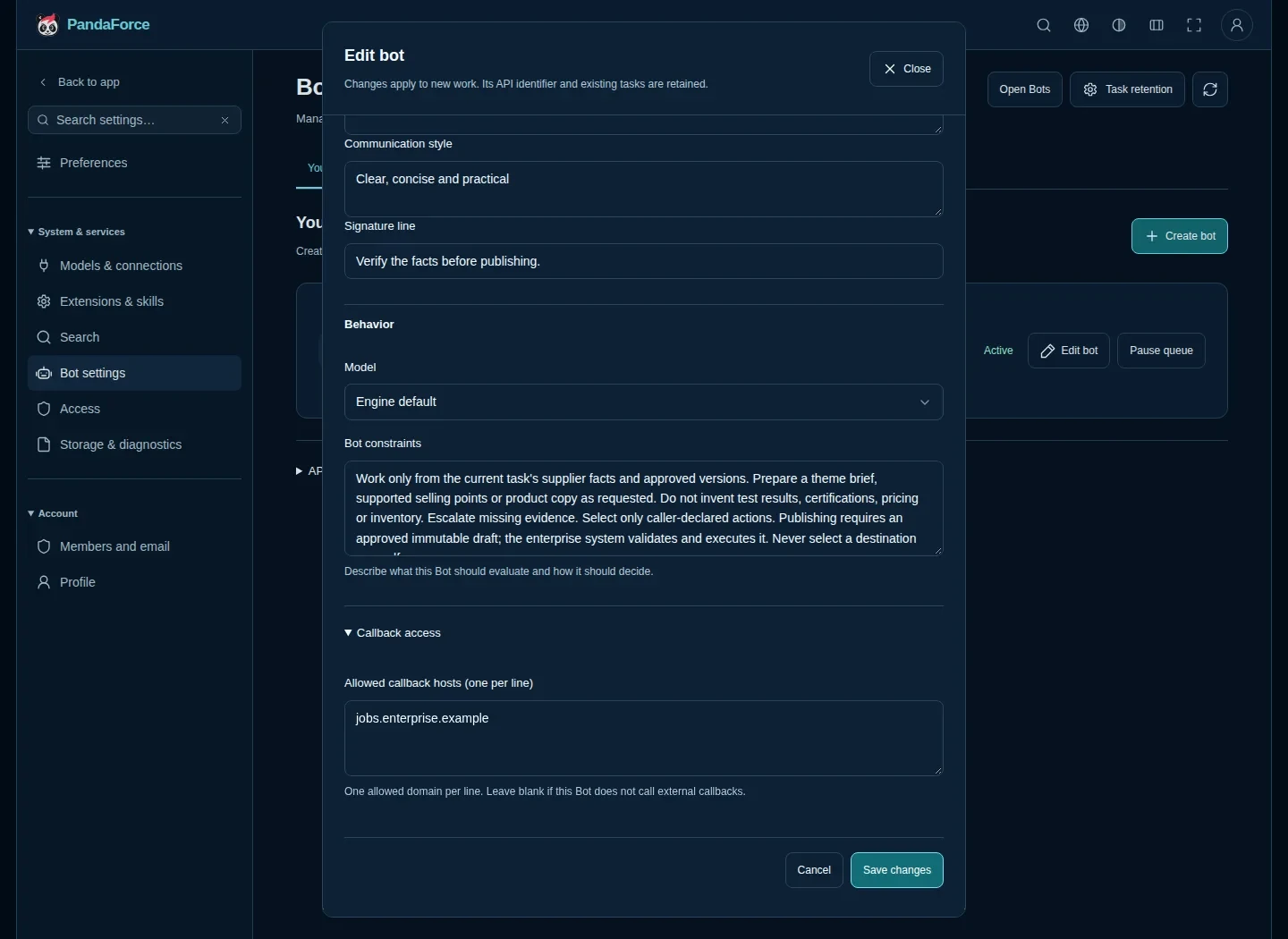
Figure 5 · Put the requirements for a kind of work into the Bot’s configuration. This example tells the assistant to work only from the facts in the material and never invent test data; the endpoint is a placeholder hostname, with no real configuration or key shown.
Once it’s set up, the business system calls POST /api/v1/bots/{code}/tasks and submits the current material, its own task reference, and the actions the Bot is allowed to take. PandaForce queues the work, processes it, and records the result; the caller can poll for it or wait for a callback. Permissions, approvals, stock, publishing — all of that keeps running in the business system, and the Bot doesn’t need its own copy of that database.[2]
The upside is practical. An integration team can spend its effort on translating the data and handling the result, rather than building yet another task-management and human-review screen. Operators move less material and run fewer repetitive first-pass checks, leaving the time for the calls that actually need experience. Whether it’s worth pushing further is something you read off the real work: how much of each draft got revised, how many missing facts needed a follow-up, how much of the old copy-and-paste is left.
06Bot integration in practice: product publishing
Here’s an anonymized product-publishing example. The tasks and screenshots are demonstration data — nothing was actually listed, and no brand or sales channel is involved.
A supplier sends a bundle of jacket material: front and back photos, an attribute sheet, a size chart, care instructions. The company’s existing material service unpacks it, keeps the originals, pulls out the text it needs, and tags a material version. What actually goes to the Bot is the facts and images this task needs; handling the original ZIP stays the integrating side’s job.
From there you hand it to the Bot in stages, in whatever order the company’s process runs:
- Check the material. Which facts are complete, which are missing, whether the photos and the attributes line up.
- Propose a theme and selling points. Working from the confirmed facts, suggest a direction, copy angles, and selling points that hold, for design and operations to use.
- Draft the product detail. Pull the title, fabric, sizing and care into a draft someone can review.
- Handle the review. If an unsupported feature claim shows up, either ask for more material or revise the draft.
- Hand it to the company’s publishing flow. Once it’s really been approved, submit a fixed version, let the business system do the listing, and keep the final receipt.
Say the material gives a size-M sample at 260 g but no waterproof test report. The “lightweight” claim has to keep its size qualification; “waterproof” is not something to fill in on your own. When a gap like that turns up, the Bot asks a specific question and sets aside the part that needs a person to decide.
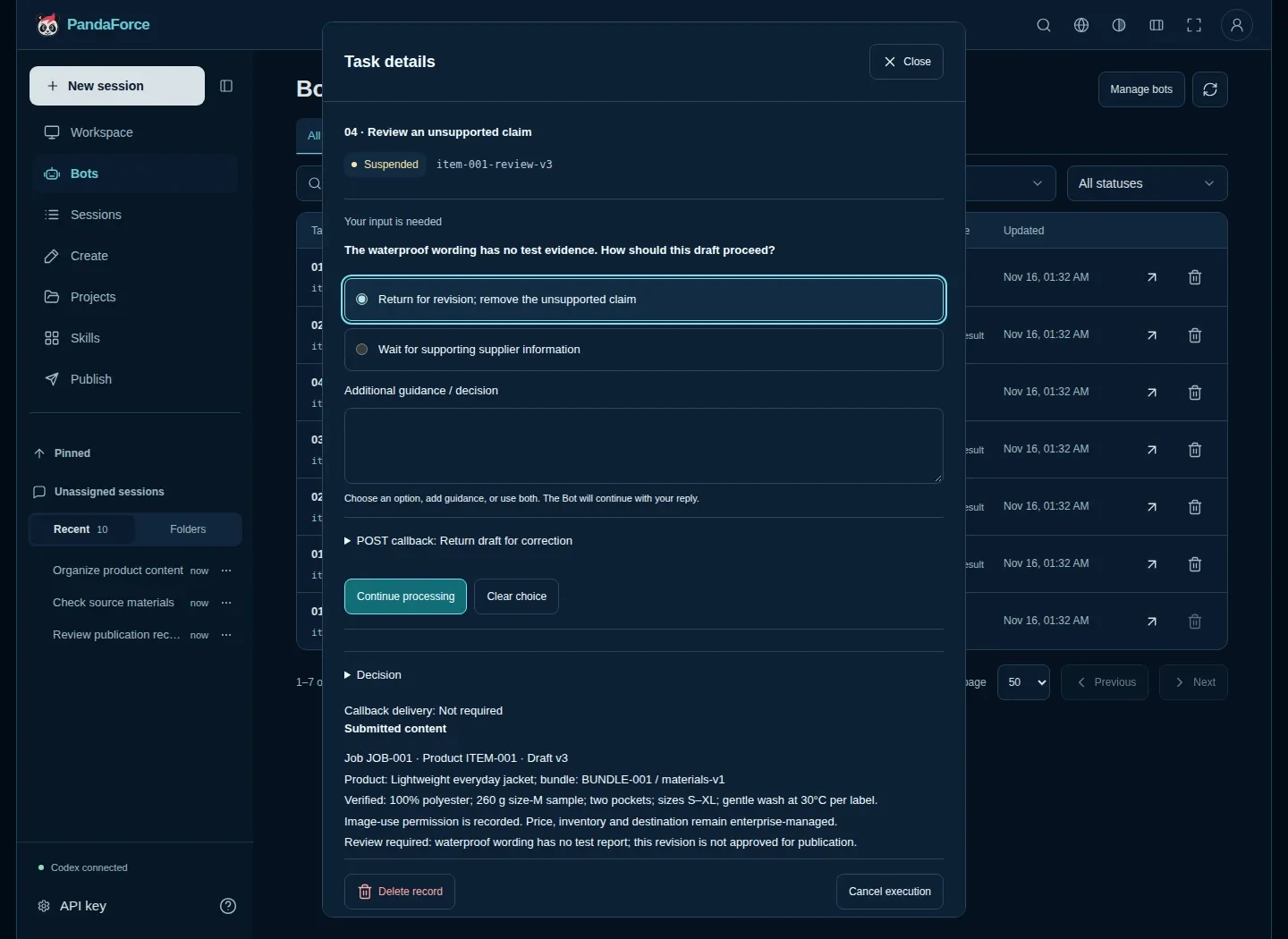
Figure 6 · A person only handles the part that takes judgment. This demonstration task asks for the evidence behind a waterproof claim. Once there’s a reply, the work continues, and the whole exchange stays in the task record.
The theme artwork, when it’s actually made, still goes through the company’s own design or rendering service; the product catalog, prices and stock still belong to the existing systems. PandaForce takes the AI stretch in the middle and the back-and-forth of review, and the company orchestrates what comes before and after. Connected this way, the product team doesn’t have to keep a second, parallel set of product data just to use AI.
With that, where a single product run saves time is easy to see: operators aren’t shuttling the same set of facts between windows, drafts come out to a fixed set of requirements, reviewers only touch what’s in doubt, and the approved version enters the publishing flow that already exists. An acknowledged call doesn’t prove the item is live — the final word comes from the business system’s receipt. The repository’s full example walks through the configuration, the requests, the review and the receipt handling.
07Requirements review and support triage connect the same way
Product publishing is only one example. The two cases below work with the same Bot interface — provided the company writes its own integration. These aren’t bundled connectors for some particular business product.
Requirements review. When a product manager submits a requirement, the requirements system hands the Bot the text, the known constraints, and the rules for this round of checking. It looks at whether the goals, the use cases, the exceptional paths and the acceptance criteria are all there, and lists whatever it can’t judge yet as open questions. The product manager fills the gaps and moves on. The real review still belongs to the team, but a batch of the same recurring basics can get cleared before the meeting.
Support triage. The support system hands the Bot the user’s description, the product version, and whatever context it’s allowed to share. With enough to go on, the Bot suggests a category and writes a summary; short on reproduction steps, it asks for them; faced with a conflict or something out of scope, it sends the case to a person. Actual assignment and replies to the customer still run through the company’s existing permissions. The first thing saved here is the time spent reading long descriptions, piecing together the background, and asking for the same basic information.
Neither case asks people to learn a new way of chatting first. The door they go in through is still the business system they know; PandaForce catches the AI task in the background and hands back a review page they can act on when it’s needed. A team can start with one line of work and widen it once the results look right.
Part IV · Run it in your own environment
08What private deployment is worth to a company
After enough years building enterprise systems, one thing is close to consensus: the data is the company’s lifeblood, and nobody wants to hand it to an outside platform. The client already has its own servers, storage and a running set of business systems; the sensible way to bring in AI is to bring it home, not to move a pile of material onto someone else’s service. PandaForce is built on that premise — it runs in your own environment, the projects, documents and task records all sit on your own machines, and the accounts and permissions are yours to set. The most concrete thing private deployment is worth is exactly that: the work stays in your hands.
What matters most is the model layer. Codex CLI is only a command-line tool — it runs the agent loop (planning, reading and writing files, calling tools, working through the task step by step); the model that actually does the inference is configured separately. Point it at an Ollama instance on your internal network, or another in-house LLM, and from the moment material comes in to the moment a result goes out, the inference stays inside your own network the whole way, never leaving. For an industry that takes its data seriously, this is close to the only way to use AI with any confidence: you get the capability, and nothing sensitive ever leaks out.[4]
Underneath all of it is the room open source gives you. PandaForce is MIT-licensed: use it commercially, change it to suit you, deploy it yourself. You can read the whole implementation, keep a version that is yours, and write the integration yourself. For a company that means not being locked to a single vendor — the system is yours, the data is yours, and where it goes next is yours to decide.[3]
09Start with one thing you repeat every day
To try the in-progress features this article describes, build from the develop branch. The repository ships a Compose build overlay:
git clone --branch develop https://github.com/hiforce/panda-force-free.git |
Once it’s up, create a local administrator, then set the model authentication for the Codex process that actually does the work. Configure SMTP when members need to join; when it’s time to connect a business system, create a Bot with a clearly bounded scope. The branch README covers the environment and the authentication steps — don’t mistake an ordinary workspace account for a model account.
The first thing can be small. Pick a task that comes up often, with fairly clear inputs and a result that’s easy to check, and bring in the person who knows it best. Work out the rules together, run a few past cases through, and find out which steps are worth handing to AI and which questions still belong to a person. Add the submission and result handling when it’s ready to connect to a system.
What I want is for PandaForce to make that first attempt easier to start. The company’s existing material keeps being useful, a person’s experience gets turned into skills over time, and a business system can call on that AI work through a Bot. Every batch of tasks should leave the team with content and methods it can use the next time.
The project is still being built. The source, the install guidance and the examples are in the PandaForce repository. Specific problems are welcome: a step that won’t connect, a skill that doesn’t help, a task that still has people carrying the same information between tools. That’s what tells me what to build next.
Project resources
- PandaForce feature catalog at the source revision used for this article. Collaboration, content, skills, knowledge, accounts and deployment requirements.
- Bot product-publishing integration example. Tasks, scoped keys, human review, callbacks and business receipts.
- README: source builds, deployment and MIT licensing.
- Model-provider configuration. Model authentication, execution environments and local services require their own configuration and validation.