
Abstract
PandaForce did not begin as a grand product plan. I wanted to spend less time guarding a terminal: let a task continue while I step away, yet still let me check progress or approve an action.
That small annoyance points to a larger problem. An AI workspace needs more than a conversation box. It needs a controlled way into the files, tools, and workflows where work already happens.
The value of an AI workspace is not merely that people can talk to AI anywhere. It is that AI can enter a real working environment safely.
Part I · I wanted to stop guarding the terminal
01The laptop that could never close
There is a running joke about Codex: once a task begins, you carry an open laptop everywhere because the agent may stop and ask for approval. I laughed because it felt uncomfortably close to ordinary life.
Codex can do substantial work, but a long task does not become shorter because I want lunch. It may be reading the repository or waiting on one confirmation. That was PandaForce’s plain beginning: the workstation stays where it belongs while I inspect the conversation, answer a question, or approve an action from a computer or phone.
02Why build this when ChatGPT already has an app?
If the ChatGPT app or another client covers your needs, there is no reason to replace it. PandaForce is not an argument for another prettier chat interface.
I design and deliver enterprise information systems. An enterprise cannot usually deliver an isolated AI app as its business system. AI must fit into identity, roles, project workflows, file storage, audit, and data boundaries. I need a workspace I can deploy, connect, and adapt. The browser is not the thesis; it is the delivery surface most readily integrated with an existing web estate.
Part II · Bring the agent to the data
03Do not push tens of gigabytes through a chat box
Video gives me a personal example. Tens of gigabytes may already live on a workstation, NAS, or storage account. Uploading it all again through a chat app is slow and breaks the workflow I already use. A better arrangement is for the agent to work beside the material while the browser handles browsing, selection, instructions, and results. Enterprise data raises the same question at a larger scale: bring controlled tools closer to the data instead of repeatedly moving data across its boundary.
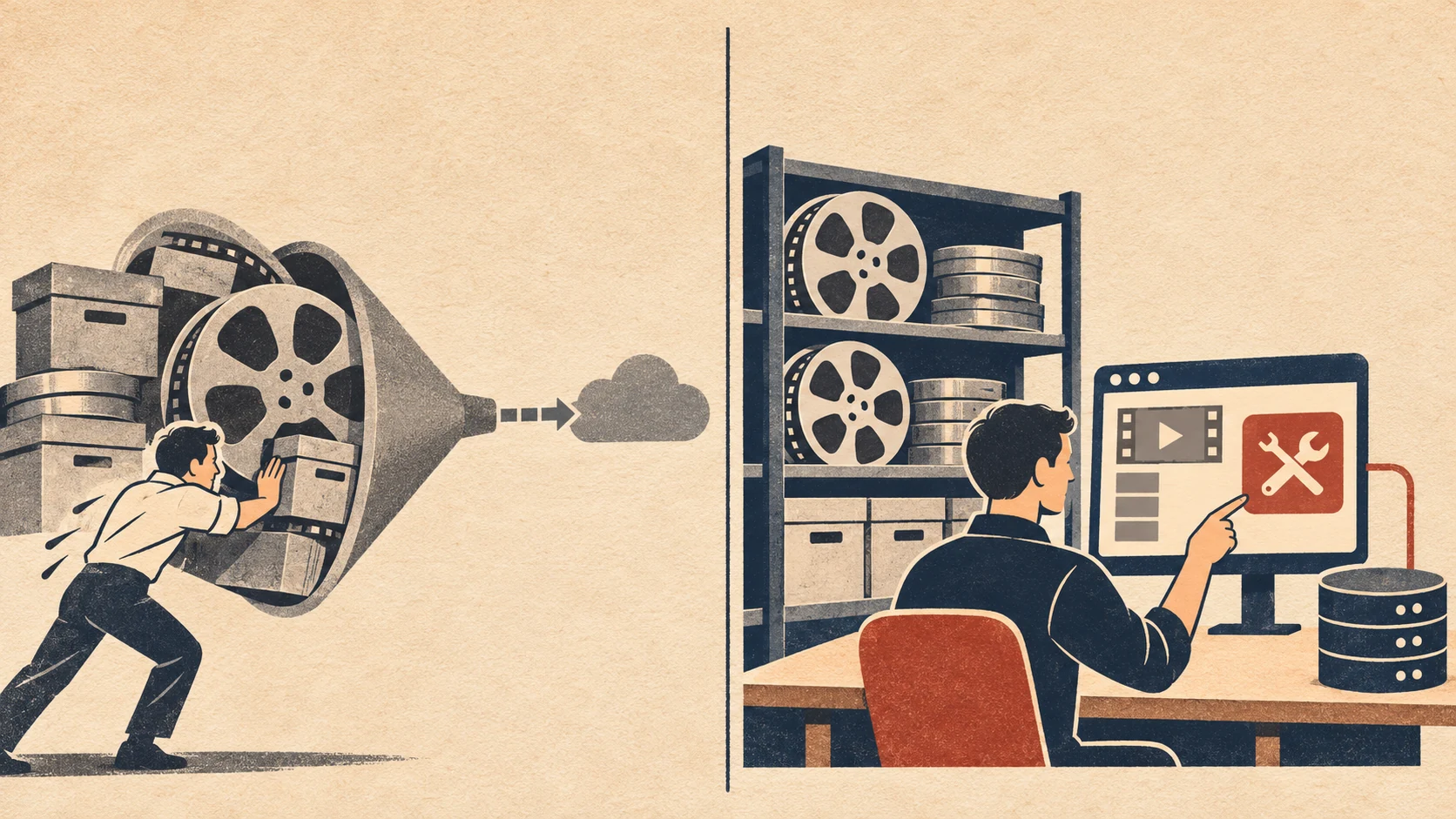
Figure 1 · Bring the agent to the material. This avoids needless transfers and preserves the existing directory, permission, and production workflow.
04What PandaForce does today
PandaForce Free is available at GitHub: hiforce/panda-force-free, and its public container image is hiforceai/panda-force. The repository remains the authority for current capabilities and installation details.
The first distinction it makes is between a project and a session. A project is how a person organizes work, with a name, code, and description. A session is the native Codex execution record. One project can collect several sessions, while unassigned history remains searchable by recency, working directory, and keyword. Days later, I can look for “that project” instead of guessing among session identifiers.
The interactions required by a task also stay on one page. Before starting, I can choose a working directory, upload a file, or paste a screenshot. During execution, the workspace shows state, token usage, model, reasoning effort, and permissions. If Codex wants to run a command, change a file, or ask structured questions, the browser presents an actionable approval or questionnaire rather than a log I can see but cannot use.
The workspace also includes file browsing, code preview, Git changes, a terminal, session goals, and a tool panel. Long histories load in pages. The view follows new output when I am at the bottom, but tries to preserve my place when I scroll upward to read. The same workspace adapts to desktop and mobile, with English and Chinese interfaces, themes, and reading-width preferences. It does not do everything, but it covers the path I travel most often with Codex.
The phone experience is not merely a desktop page squeezed into a narrow viewport. The composer keeps frequent controls for attachments, permissions, model settings, queueing, and sending. A bottom sheet presents usage, execution state, and shortcuts into files, changes, and the terminal. Light, Graphite, Silk, and Aurora can be selected directly. The walkthrough later in the essay uses the Aurora phone interface to show the complete path from first setup to a working session.
Part III · Start with a personal tool
05It did not start from zero
I did not build PandaForce from scratch. It is derived from Codex WebUI, released by lezi-fun under the MIT license. That upstream project provided the initial web interface and codebase. I want to thank its author and contributors explicitly. PandaForce retains the original copyright, MIT license, and third-party notices in its source distribution.
As I used the software more deeply, I needed a different product model for projects, mobile work, attachments, authentication, internationalization, complete agent interactions, and engineering quality. PandaForce gradually took an independent path, adding its own product design and substantial work on module boundaries, state ownership, and release verification. None of that should hide where it began. The ability to start from existing work and carry it in a new direction is part of the value of open source.
06It may grow into an enterprise AI workspace
Codex is the only engine PandaForce truly integrates today, and the first problems it solves are my own. I do not want to present “possible later” as “already shipped.” Teams will nevertheless need permissions, shared projects, single sign-on, audit, and cost controls; enterprises will connect their own models, knowledge, and business tools.
I hope PandaForce becomes more than “Codex in a browser”: an open workspace connecting people, AI, data, and workflows. It began with a small wish—to stop carrying a laptop that could never close. I will discover the rest by using it and building the answer a piece at a time.
Part IV · From installation to the first session
07Start PandaForce with Docker
Docker Compose is the shortest path. The current public image targets Linux amd64 and expects Git, Docker, and Compose. This walkthrough does not stop at “the container is running”; it continues from an empty installation to the first conversation.
1. Start the container
Begin by cloning the GitHub repository introduced above:
git clone https://github.com/hiforce/panda-force-free.git |
The last command is useful for checking startup, and it may also print the one-time installation code required during initial setup. Keep that terminal available.
The default is isolated mode: PandaForce and Codex both run inside the container. The host needs neither a prior Codex installation nor copied host credentials.
2. Create the first administrator
Open http://localhost:8899. A fresh installation asks you to create a PandaForce administrator before it reveals the workspace:
- Installation code: setup requests this when initialization happens through a remote address or reverse proxy. Read the one-time code from
docker compose logs panda-force. - Administrator username: use 3–64 characters drawn from letters, numbers, periods, underscores,
@, and hyphens. - Password: use 6–256 characters and include an uppercase letter, a lowercase letter, and a number.
- Confirm password: enter the same password again. The administrator record is then retained in the container’s persistent data volume.
This account protects PandaForce itself; it is separate from the Codex or model-provider account used later. Do not publish the installation code, administrator password, or workspace port on the open internet.
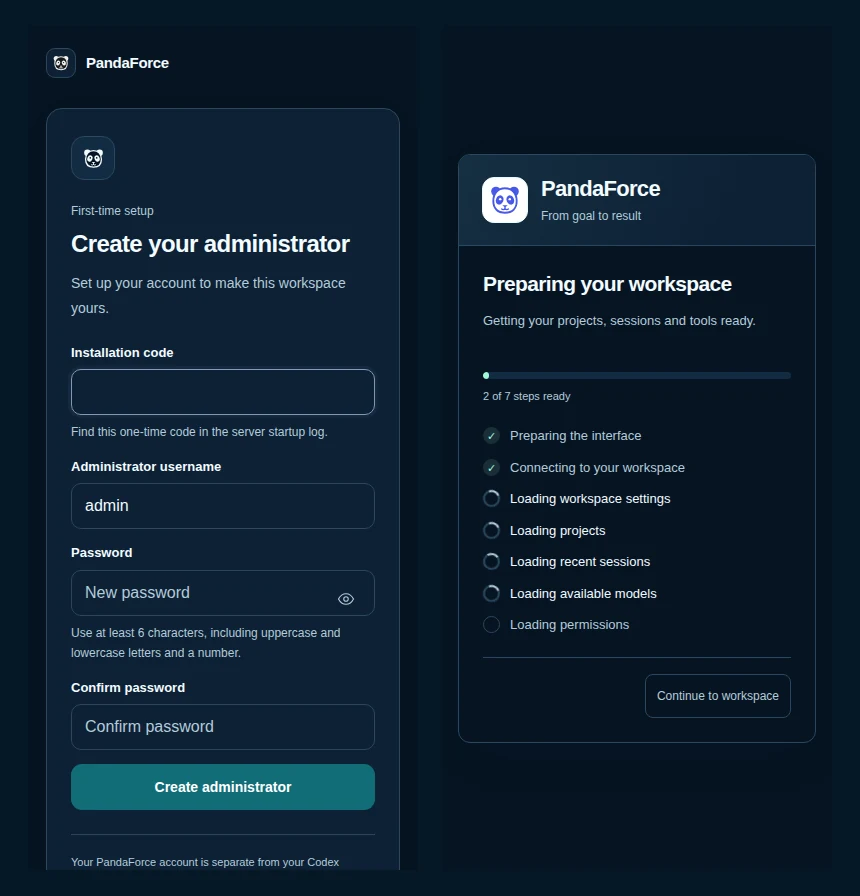
Figure 2 · Establish the access boundary before loading the working environment. Initial administrator setup is on the left. The screen on the right connects to the workspace and reads settings, projects, sessions, models, and permissions. It reports actual loading work rather than displaying an indefinite spinner.
After submission, a preparation screen appears. It works through the interface, service connection, workspace settings, projects, recent sessions, available models, and permissions. On a first visit or a slow connection, this tells me where progress stopped. A non-critical read failure can offer a retry or an explicit way to continue instead of leaving me to wonder whether the page died.
3. Connect the Codex account
The administrator answers “who may enter PandaForce.” The Codex process inside the container still needs authorization to call the model service. Run these commands on the host:
docker compose exec -it panda-force codex login --device-auth |
Follow the URL and device code printed in the terminal, restart the container, and refresh the browser. These remain two different boundaries: device authentication lets Codex call the model, while the PandaForce administrator controls access to the workspace.
4. Go from the workspace home to the first session
After preparation, the workspace home appears. Create a project or leave the task unassigned, select a working directory mounted into the container, and describe the task. Add context by uploading a file, pasting a screenshot, or browsing material already present in the workspace.
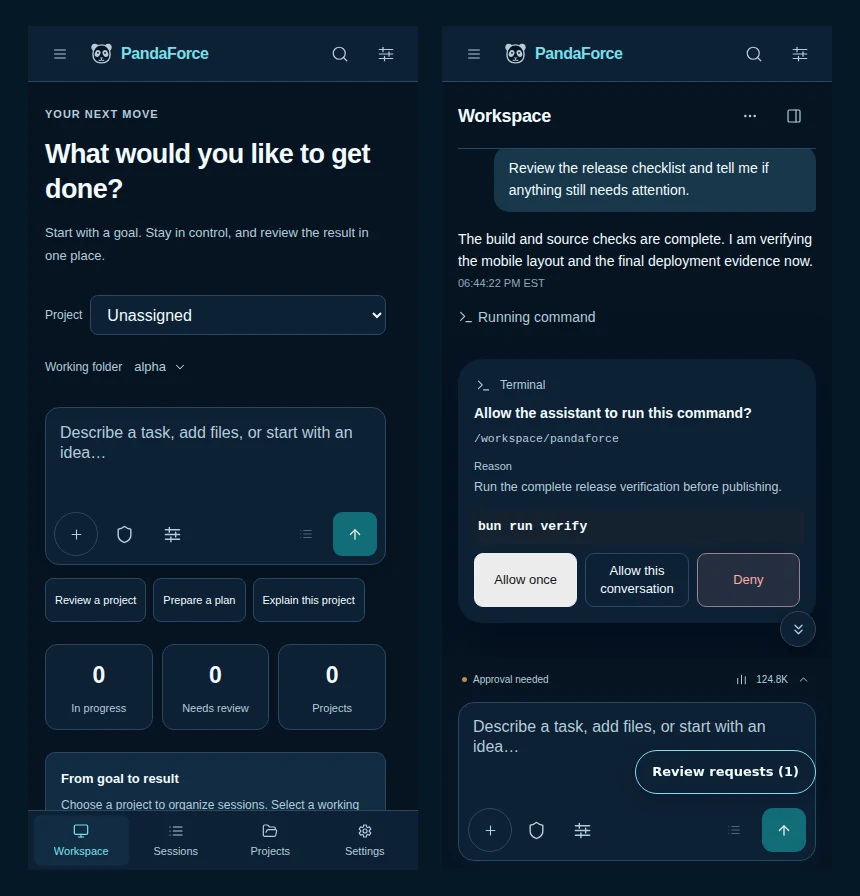
Figure 3 · Home starts the work; the session page carries it through. Select a project and folder and state the goal on the left. During execution, the conversation on the right shows messages, explains why work is waiting, and presents command approval. The production interface is shown with sanitized demonstration data.
Approvals, structured questions, execution state, and file changes return to that same conversation. The session panel exposes context usage, current state, and shortcuts into files, Git changes, and the terminal. Frequently used tools can be enabled, pinned, and reordered. The appearance can switch among Light, Graphite, Silk, and Aurora.
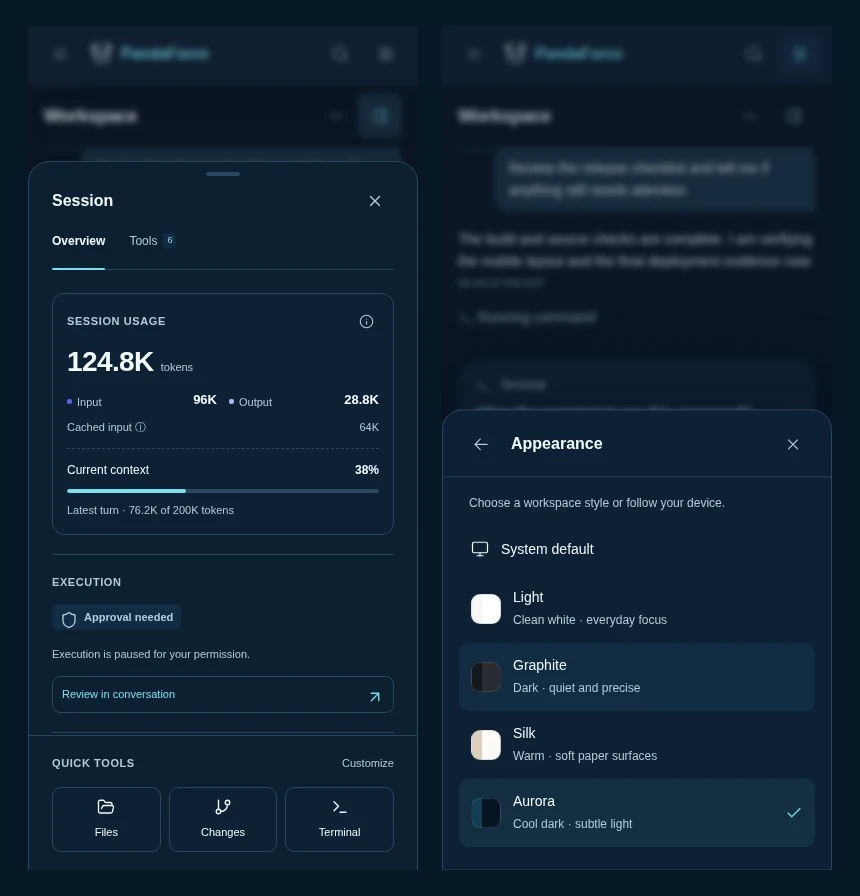
Figure 4 · The phone is not a read-only remote. Session state and working tools are collected on the left, while the available appearances are shown on the right. Aurora’s cool dark palette is selected here.
If the host already runs Codex, PandaForce also offers shared mode. The container connects to that service over a Unix socket and mounts the same working directories, preserving its native sessions. What is shared is a running service, not merely a copied authentication file, so the socket, Unix permissions, and absolute paths must line up. The repository’s installation guide contains the complete command and Kubernetes templates.
The default port is bound only to the local machine. For remote use, choose an SSH tunnel or configure an HTTPS reverse proxy and appropriate authentication. Never expose the workspace, terminal, or native Codex control socket directly to the public internet. PandaForce creates more freedom, and that freedom also makes the deployer responsible for the surrounding data and permission boundary.
Project and further reading
- PandaForce Free: source, installation, and releases
- PandaForce container images
- lezi-fun/codex-webui, the MIT-licensed project on which PandaForce builds and which it gratefully acknowledges.